Home
Shop
Wishlist0

+971 50 750 4818

Recently Viewed

How to Choose the Right SSD for Your Needs (Complete 2026 Guide)

In today’s fast-paced digital world, speed matters. Whether you’re a student, gamer, or business professional, upgrading to a Solid State Drive (SSD) can significantly improve your device performance. But with so many options available, choosing the right SSD can be confusing.

This guide will help you understand everything you need to know before buying the perfect SSD for your needs.

What is an SSD?

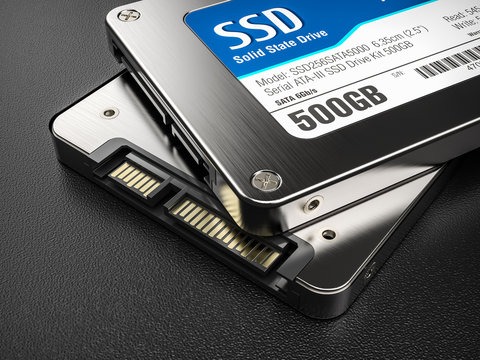
A Solid State Drive (SSD) is a storage device that uses flash memory to store data. Unlike traditional hard drives, SSDs have no moving parts, making them:

  • Faster ⚡
  • More durable 💪
  • Energy-efficient 🔋
choose the right SSD

Types of SSDs

Choosing the right type is the first step.

🔹 SATA SSD

  • Slower compared to newer SSDs
  • Affordable and widely compatible
  • Best for upgrading old laptops/desktops

🔹 NVMe SSD

  • Extremely fast performance 🚀
  • Uses PCIe interface
  • Ideal for gaming, video editing, and heavy tasks

🔹 External SSD

  • Portable and easy to use
  • Great for backups and file transfers

Storage Capacity: How Much Do You Need?

Choose based on your usage:

  • 128GB – 256GB → Basic use (documents, browsing)
  • 512GB → Students & office work
  • 1TB or more → Gaming, content creation, business

👉 Tip: Always choose slightly higher capacity than your current need.

Speed Matters

SSD speed is measured in read/write speed.

  • SATA SSD → ~500 MB/s
  • NVMe SSD → Up to 7000 MB/s

👉 If you want fast boot time and smooth performance, go for NVMe.

Compatibility Check

Before buying:

  • Check your laptop/desktop supports SATA or NVMe
  • Verify M.2 slot availability
  • Check size (2.5-inch or M.2)

👉 This step avoids buying the wrong SSD.

Budget vs Performance

  • Low Budget → SATA SSD
  • Mid-Range → NVMe SSD (best value)
  • High-End → High-speed NVMe (for professionals)

Best Use Cases

  • Students → 256GB / 512GB SATA or NVMe
  • Gamers → 1TB NVMe SSD
  • Office Use → 512GB SSD
  • Businesses → 1TB+ NVMe SSD for performance

Why Upgrade to SSD?

Upgrading to SSD gives:

  • Faster boot time ⏱️
  • Improved multitasking
  • Better system performance
  • Longer device lifespan

Choosing the right SSD depends on your needs, budget, and device compatibility. If you want speed and performance, NVMe is the best option. For budget upgrades, SATA SSD still offers great value.

Investing in the right SSD will enhance your productivity and overall experience.

7 Pen Drive Benefits: The Ultimate Portable Storage Solution

In today’s fast-paced digital world, having a reliable and portable storage device is essential. A pen drive, also known as a USB flash drive, has become one of the most convenient tools for storing, transferring, and backing up data. Whether you are a student, professional, or business owner, a pen drive offers a simple yet powerful solution for your data needs.

Pen Drive

What is a Pen Drive?

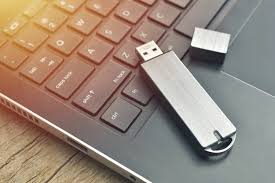
A pen drive is a compact USB storage device that uses flash memory to store data. It can be easily connected to laptops, desktops, and other compatible devices, allowing quick access to files anytime, anywhere.

Benefits of Using a Pen Drive

1. Highly Portable

A pen drive is small and lightweight, making it easy to carry in your pocket or bag.

2. Easy to Use

Simply plug in the pen drive, and you can instantly transfer files without installing any software.

3. Large Storage Capacity

Modern pen drives come in different storage sizes, allowing you to store documents, photos, videos, and more.

4. Fast Data Transfer

With advanced USB technology, a pen drive ensures fast and efficient file transfer.

5. Durable and Reliable

A pen drive has no moving parts, making it more durable compared to traditional storage devices.
Common Uses of a Pen Drive

  • File transfer between devices
  • Backup of important data
  • Storing office documents and presentations
  • Carrying media files like videos and music
  • Software installation

How to Choose the Best Pen Drive

When buying a pen drive, consider:

  • Storage capacity based on your needs
  • USB version for better speed
  • Build quality for durability
  • Brand reliability

Tips for Using a Pen Drive Safely

  • Always eject the pen drive properly
  • Scan for viruses regularly
  • Keep backup copies of important files
  • Avoid physical damage

Conclusion

A pen drive is one of the most convenient and practical storage devices available today. Its portability, speed, and ease of use make it a must-have for anyone dealing with digital data. Investing in a high-quality pen drive ensures your data stays safe and accessible at all times.

Back to Top
Product has been added to your cart