How to Choose the Right SSD for Your Needs (Complete 2026 Guide)
In today’s fast-paced digital world, speed matters. Whether you’re a student, gamer, or business professional, upgrading to a Solid State Drive (SSD) can significantly improve your device performance. But with so many options available, choosing the right SSD can be confusing.
This guide will help you understand everything you need to know before buying the perfect SSD for your needs.
What is an SSD?
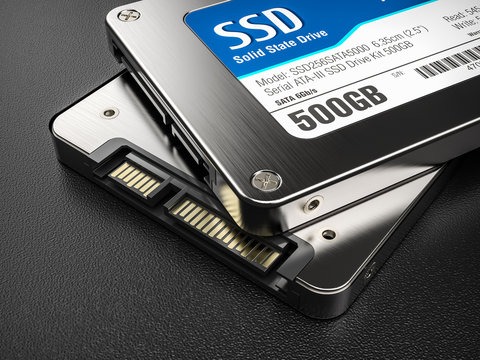
A Solid State Drive (SSD) is a storage device that uses flash memory to store data. Unlike traditional hard drives, SSDs have no moving parts, making them:
Faster ⚡
More durable 💪
Energy-efficient 🔋
Types of SSDs
Choosing the right type is the first step.
🔹 SATA SSD
Slower compared to newer SSDs
Affordable and widely compatible
Best for upgrading old laptops/desktops
🔹 NVMe SSD
Extremely fast performance 🚀
Uses PCIe interface
Ideal for gaming, video editing, and heavy tasks
🔹 External SSD
Portable and easy to use
Great for backups and file transfers
Storage Capacity: How Much Do You Need?
Choose based on your usage:
128GB – 256GB → Basic use (documents, browsing)
512GB → Students & office work
1TB or more → Gaming, content creation, business
👉 Tip: Always choose slightly higher capacity than your current need.
Speed Matters
SSD speed is measured in read/write speed.
SATA SSD → ~500 MB/s
NVMe SSD → Up to 7000 MB/s
👉 If you want fast boot time and smooth performance, go for NVMe.
Compatibility Check
Before buying:
Check your laptop/desktop supports SATA or NVMe
Verify M.2 slot availability
Check size (2.5-inch or M.2)
👉 This step avoids buying the wrong SSD.
Budget vs Performance
Low Budget → SATA SSD
Mid-Range → NVMe SSD (best value)
High-End → High-speed NVMe (for professionals)
Best Use Cases
Students → 256GB / 512GB SATA or NVMe
Gamers → 1TB NVMe SSD
Office Use → 512GB SSD
Businesses → 1TB+ NVMe SSD for performance
Why Upgrade to SSD?
Upgrading to SSD gives:
Faster boot time ⏱️
Improved multitasking
Better system performance
Longer device lifespan
Choosing the right SSD depends on your needs, budget, and device compatibility. If you want speed and performance, NVMe is the best option. For budget upgrades, SATA SSD still offers great value.
Investing in the right SSD will enhance your productivity and overall experience.



Leave a comment